
background image
Description
Draws a background image in place of the defaultbg color. Instead of
loading an image file itself, st uses the pixmap published by the
companion program stbg in the _ST_BACKGROUND_IMAGE root window
property. Every st instance tiles the same server-side pixmap, so the
image data is held in memory only once and all instances stay in sync.
Download
Usage
The background image is set by the separate stbg tool, which reads a
farbfeld image and publishes it on the
root window:
cc -o stbg stbg.c -lX11
stbg wallpaper.ff
stbg - < wallpaper.ff
Once the image is published, every st started afterwards tiles it across
its window. Re-running stbg with a new image updates all running st
instances immediately; there is no need to restart or reload them.
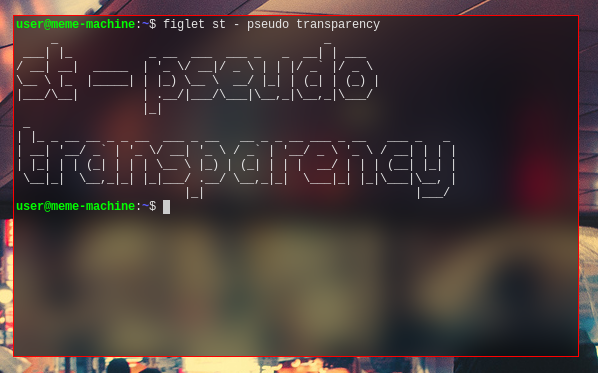
Pseudo Transparency
The variable pseudotransparency in config.def.h fixes the
coordinates of the background image to the screen origin. This emulates
the effect of transparency without the need for an X composite
manager.
Hint: Because image processing is done outside of st, effects can be applied to the desktop background in an automated fashion with external tools. Pictured below is an example of the result of a darken and blur operation using farbfeld utilities:
jpg2ff < wallpaper.jpg | ff-border e 50 | ff-bright rgba 0 0.5 1 | ff-blur 50 15 | stbg -
Legacy versions
Older versions of this patch loaded the farbfeld image directly inside st. They still work but have several shortcomings that are fixed by the 0.9.3 version above:
- Per-instance decoding. Each st instance read and decoded the image file from disk and created its own copy of the pixmap. With several terminals open the same image was held in memory multiple times.
- No live updates. The background was only loaded at startup.
Updating it required the signal reload hack: sending a
USR1signal to every st process (pidof st | xargs kill -s USR1) after regenerating the image file, assuming the extrast-background-image-signal-reload-0.8.5.diffpatch had been applied on top. - Recompilation to change the image. The image path was baked in
at build time via the
bgfilevariable inconfig.h. - File format parsing inside the terminal. The farbfeld loading
code, including
arpa/inetbyte-swapping, lived inx.c, tying the terminal to a single image format.
Legacy downloads:
- st-background-image-0.8.4.diff
- st-background-image-0.8.5.diff
- st-background-image-signal-reload-0.8.5.diff
Authors
- Matthias Schoth - mschoth@gmail.com